
Category: random

 You can’t visit Iceland without checking out the Blue Lagoon. Oh, I’ve heard all the arguments against it: It’s a tourist trap. It’s a manmade attraction. It’s expensive. All these claims are at least somewhat true—but that doesn’t detract from the fact that the Blue Lagoon is still pretty freaking awesome.
View original post 245 more words
Team Data strikes again 🙂

Stuff happens all the time on WordPress.com. You’re blogging, commenting, liking, and following like never before. Every hour a record is broken and someone’s day is made. We’ve always known about your love affair with stats. We like watching numbers grow, too. And we also like to see the events that the numbers represent. We think of Notifications as a magnifier for Stats: you can zoom in to see exactly who did what and then connect with them.
The original Notifications menu first appeared in the WordPress.com toolbar as a small orange button and a stream of activities related to your blogs and comments. It was a good start but we’ve had bigger plans all along. Today we deployed a new toolbar button and, more significantly, a new tab on the WordPress.com home page.
The New Button

The first thing you’ll notice is that there is no number. We axed…
View original post 338 more words
How to pronounce Eyjafjallajökull
Celebrating the latest update on WordPress.com notifications and the fact my team at Automattic is coming to Iceland for a visit by teaching you how to pronounce Eyjafjallajökull:
Fun

I’ve been going over my iPhoto library and bumped into a couple of short videos I shot while flying an Aerobatic Flight over Reykjavik in 2006. My kids (and of course my other half) gave me that flight for my birthday. It was one of the most memorable gifts I’ve had. Would love to go again, highly recommend it.
This is the plane I went on:
And here is the view from the cockpit:
Awesome tool that can help you with those responsiv.es!

My work has had me focused on making websites more responsive. Part of taking a non-responsive design and back-porting some media queries into the CSS is identifying where the breakpoints for a particular design exist.
To aid in identifying where these breakpoints are I built a page with an iframe in it that would tell me how wide it is at any given time. More features were added and eventually we had a useful little tool. So here it is for your pleasure, the elegantly named:
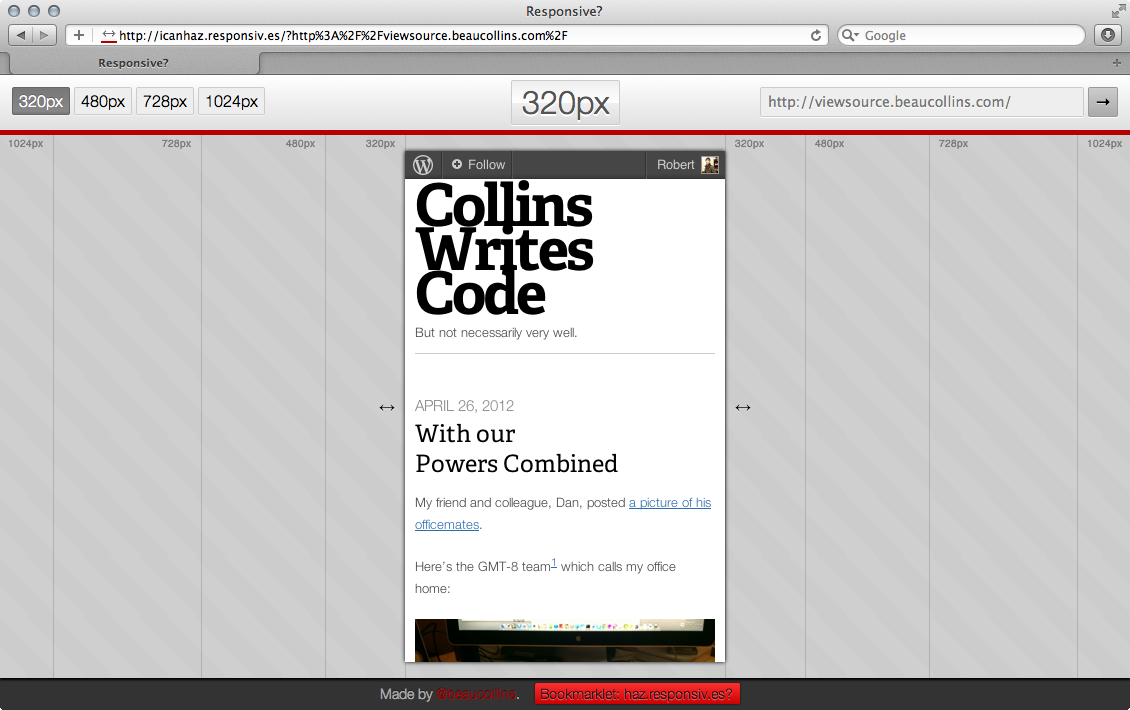
One particularly useful features is the bookmarklet. Drag that thing to your browser’s bookmark bar and then click it when you want to load up whatever page you happen to be looking at.
If you’d like to check out the source code it’s on Github. It’s mostly client side Javascript but with a little Node.js and CoffeeScript to help determine the X-FRAME-OPTIONS
View original post 7 more words
This has to be the coolest Automattic Worldwide WP 5K ever

Michelle and I did our 5+k a day or two early, and all we got were these geocaches.

To complete the 30 YEARS OF PACMAN and The Smiley Series geocaching “geoart” series, we:
- Walked 14 miles in the desert,
- Found 57 geocaches,
- Suffered 95°F heat, and
- Drank one metric ton of water.

Back in 2010 we introduced the exciting new ability to Like the individual posts you’ve read all around WordPress.com. It’s been one of our most popular features since then, as evidenced by the chart below that goes up-and-to-the-right as an indication of great success and achievement.
Today I’m happy to announce a few enhancements to the way Likes work that we think you’ll really like. 🙂
Show Likes on Pages
In the past, we’ve always restricted Likes to individual blog posts. Given the success of Likes, we want to make it as easy as possible for everyone to Like what they are reading, wherever they are reading it. Likes now share the same display settings as your sharing buttons (which you can change from Settings -> Sharing in your dashboard). In addition to showing Likes on single posts, you can now show Likes on all of your site’s content:

Here’s…
View original post 152 more words
 egill.blog
You must be logged in to post a comment.